Application structure and I/O
Most Ledger OS applications follow a host-driven model: the application on the device does not act autonomously. Instead, it waits for commands from a host process running on a computer or smartphone, performs a secure operation (signing, encryption, derivation), and returns a response. This page explains how that command-and-response cycle works and how the SDK supports it.
The APDU interpretation loop
The command-and-response scheme is modelled on the ISO/IEC 7816-4 smartcard protocol. Each packet is called an APDU (Application Protocol Data Unit). The device application is driven by a never-ending loop that calls io_exchange(...) from the SDK on every iteration:
// Pseudocode for the main APDU loop
while (true) {
    // Send the previous response (if any) and block until the next command arrives.
    uint8_t *rx_buffer = io_exchange(CHANNEL_APDU, tx_len);

    // Dispatch to the appropriate handler based on the command byte.
    handle_apdu(rx_buffer);
}
Each call to io_exchange does two things in sequence:
- Sends the response APDU that was prepared in the previous iteration (skipped on the very first call).
- Blocks until the host sends the next command APDU, then returns a pointer to the received data.
Asynchronous replies
Some operations require the user to confirm an action on the device before the response is sent — for example, approving a transaction before signing it. In this case the application cannot reply immediately, so it uses the IO_ASYNCH_REPLY flag to defer the response:
// In the APDU handler: defer the reply and wait for user input.
io_exchange(CHANNEL_APDU | IO_ASYNCH_REPLY, 0);

// Later, in the button-press handler, after the user approves:
io_exchange(CHANNEL_APDU | IO_RETURN_AFTER_TX, response_len);IO_ASYNCH_REPLYtells the SDK to send no data now and return control to the application.IO_RETURN_AFTER_TXsends the queued response and immediately returns without waiting for the next command — the main loop will callio_exchangeagain to receive it.
For a worked example, see blue-app-samplesign : the sign-message handler sets IO_ASYNCH_REPLY (line 510), and the approval/denial button handlers send the deferred response using IO_RETURN_AFTER_TX (line 434).
The Event / Commands / Status model
The APDU loop above is a synchronous request-response model. Ledger OS also exposes an Event / Commands / Status (ECS) model that decouples input events (button presses, USB/BLE packets, timer ticks) from the APDU response cycle. ECS is designed to avoid the limitations of the synchronous model and lets developers build custom event-processing loops when the default APDU dispatcher does not fit their use case.
Transport-layer flexibility
The APDU protocol is not implemented by Ledger OS itself — it is entirely the responsibility of the SDK. This means applications can replace or augment it:
- Alternative protocols: an application can implement a custom protocol on top of USB HID, USB CCID, or BLE instead of APDU.
- Custom USB enumeration: applications can modify how the device is enumerated as a USB device by the host.
The diagram below shows the common protocol stack used across Ledger OS applications:
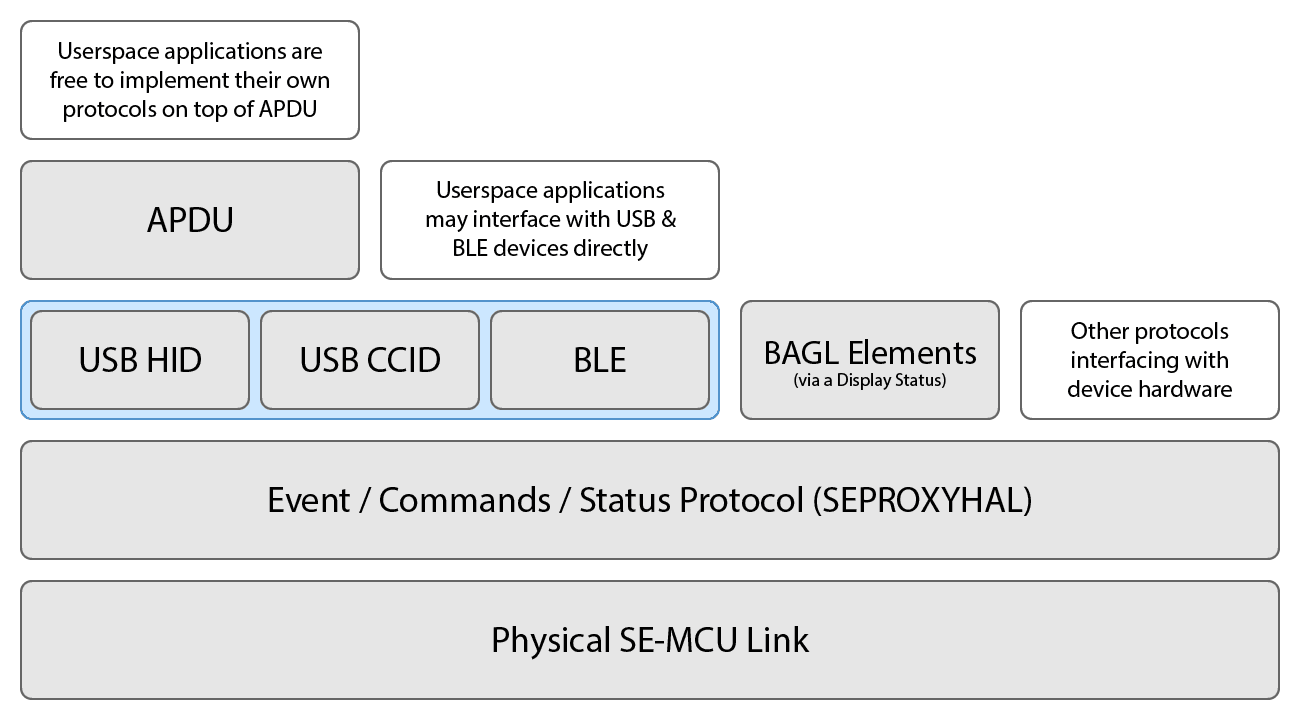 Common protocols across Ledger OS applications
Summary
| Concept | Purpose |
|---|---|
io_exchange(CHANNEL_APDU, len) | Send a response and block for the next command |
IO_ASYNCH_REPLY | Defer the response until user confirms on-device |
IO_RETURN_AFTER_TX | Send the deferred response and return immediately |
| ECS model | Alternative event loop for non-APDU use cases |
Further reading
- Application isolation — how Ledger OS restricts memory access between apps and the OS.
- Security specificities — common APDU-level security pitfalls and how to avoid them.
- App boilerplate — a working starting point that includes a full APDU dispatch loop.
