Clear Signing overview
Clear Signing turns the raw, encoded data of a blockchain transaction into plain language that a person can read and verify before approving it. Instead of an opaque hexadecimal string, the signer’s Secure Screen shows the real intent of the transaction: what it does, who receives what, and how much. The guiding principle is simple — what you see is what you sign.
Ledger’s documentation focuses on Ledger-specific tools and integrations. For ERC-7730 descriptor authoring, schemas, examples, and validation, use ClearSigning.org Build ; follow the registry’s submission process to publish.
The problem: blind signing
When a wallet cannot decode a transaction, the user faces blind signing: they approve a screen full of unreadable calldata with no way to confirm what they are authorizing. This is where phishing and malicious contracts do their damage, because the user cannot tell a legitimate transfer from a hostile one.
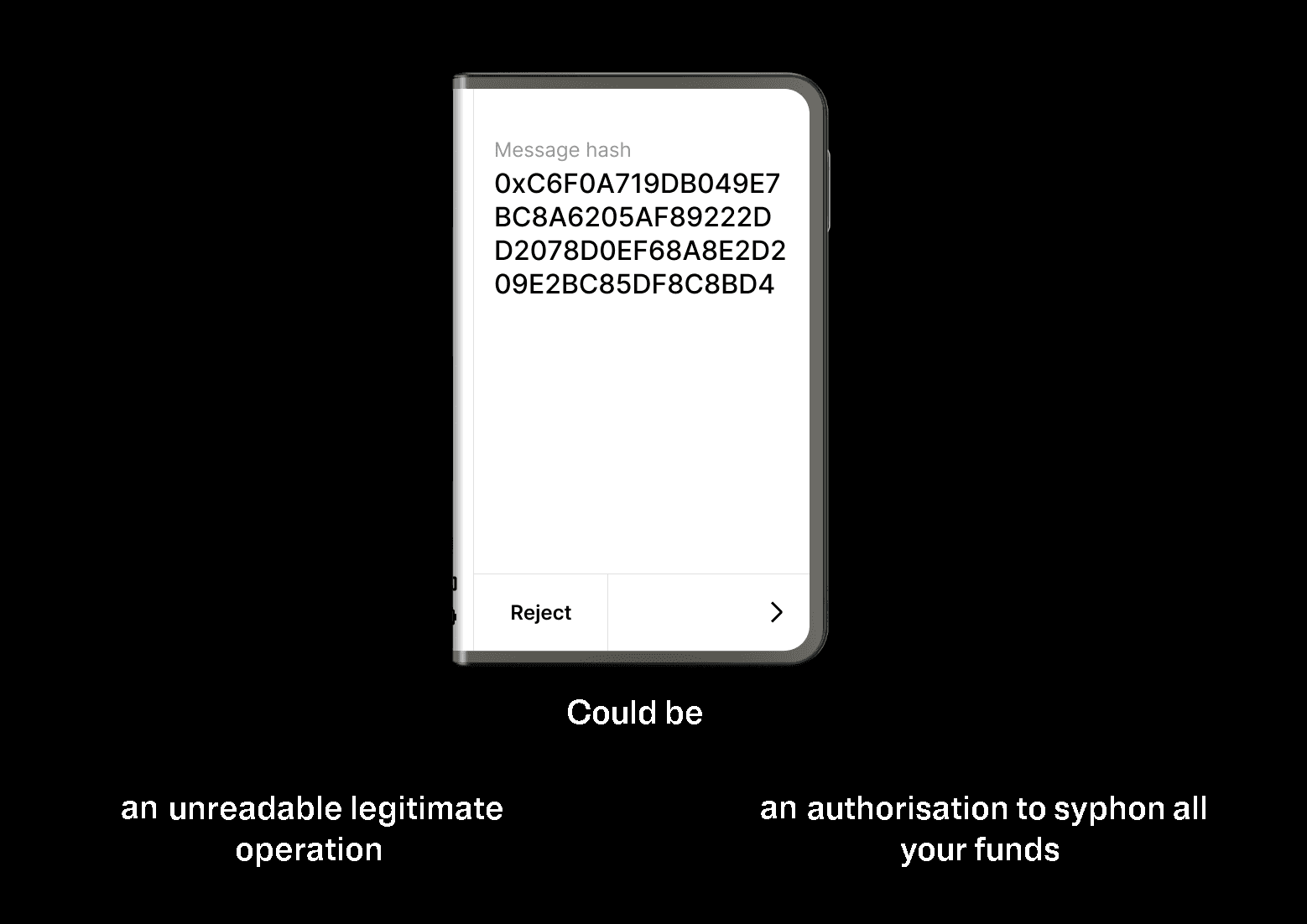
Two common safeguards fall short on their own. Transaction simulation predicts an outcome but strips away context, so a legitimate cross-chain transfer can look like a total loss. An ABI decodes the function call but cannot establish intent or trust, and a malicious contract can publish a deceptive one. Clear Signing addresses the gap directly by describing, in the protocol’s own terms, what a given call means.
How Clear Signing works
Clear Signing is defined by ERC-7730 , an open Ethereum standard. A protocol author publishes metadata that maps supported contract functions or messages to human-readable fields. At signing time, a compatible wallet can use matching metadata to render the transaction in plain language on the signer’s Secure Screen. Clear Signing never modifies the transaction; it adds a display layer that is verified on the signer itself.
For the canonical description of descriptors, supported schema features, and validation, see ClearSigning.org Build . Follow the registry’s submission process to publish.
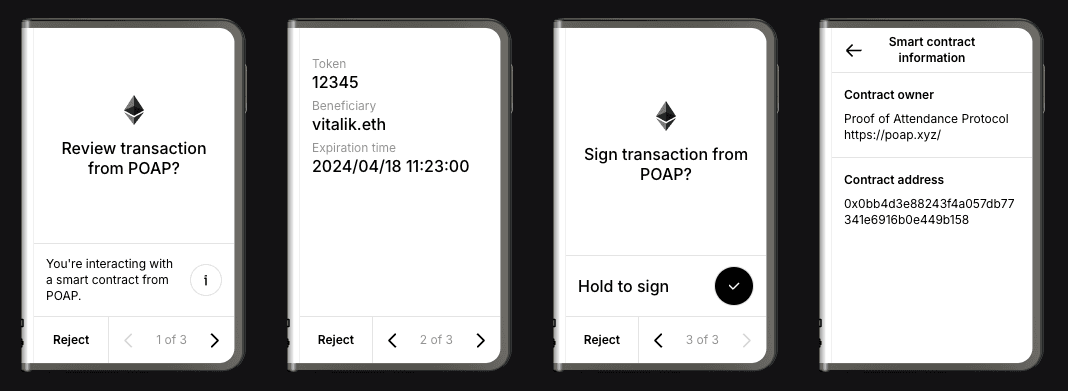
A POAP claim displayed with Clear Signing on Ledger Stax
ERC-7730 authoring lives at ClearSigning.org Build . Use it for the current specification, schemas, examples, and validation resources; use the registry’s submission process to publish. This documentation covers Ledger tools and integrations.
From Ledger to the Ethereum Foundation
Ledger introduced Clear Signing in 2023 as an open-source security initiative and formalized it as the ERC-7730 standard. From the start it was designed to be open and permissionless: any protocol can describe its contracts, and any wallet can render them.
For a standard meant to protect the whole ecosystem, neutrality matters more than authorship. On May 12, 2026, Ledger transferred stewardship of Clear Signing to the Ethereum Foundation, through its Trillion Dollar Security Initiative. The descriptor registry now lives under the Ethereum Foundation, where anyone can mirror it and no single vendor controls it.
Ledger remains an active steward alongside Trezor, MetaMask, WalletConnect, Sourcify, Fireblocks, Cyfrin, and others, and it continues to ship Clear Signing across its products — Ledger Wallet, Ledger Enterprise Multisig, and Ledger Direct Access in dApps. That is the focus of this documentation: the Ledger-specific side of Clear Signing, from the tools that generate descriptors to the kits that bring it into a wallet. For the neutral, ecosystem-wide view, see the Ledger announcement, Stewardship of Clear Signing passed to the Ethereum Foundation , and clearsigning.org .
When users see Clear Signing
Once a protocol has a descriptor in the registry, its transactions display as Clear Signed on Ledger Signers in the following contexts.
When the transaction originates from a Ledger Wallet interface:
- Through the Ledger Wallet application over WalletConnect: always available
- Through the Ledger Wallet application’s web3 browser, or the Ledger Wallet Button (direct connectivity between a dApp’s front end and the signer): only if the dApp has implemented that integration
When the transaction originates from a third-party wallet, it displays as Clear Signed if that wallet has a Clear Signing agreement in place with Ledger.
On Ledger touchscreen signers, Clear Signing works alongside Transaction Check, which screens transactions for suspicious patterns and warns the user before they confirm. Together they form a layered defense: Clear Signing shows what a transaction does, and Transaction Check flags when it looks dangerous.
Build with Ledger
Further reading
- ClearSigning.org Build — ERC-7730 authoring, schemas, examples, and validation
- Registry submission process — publish metadata to the ERC-7730 registry
- ERC-7730 specification — the Ethereum Improvement Proposal
- Stewardship of Clear Signing passed to the Ethereum Foundation — Ledger’s announcement of the move
